

Back in January 2025, Google announced it would stop showing breadcrumbs in mobile search results to keep the interface clearer. In a few days, half the SEO industry decided breadcrumbs were dead, and the other half quietly kept going.
However, both groups missed the point. Breadcrumbs were never a search snippet decoration.
They are one of the few elements on a website that do three jobs at once: they orient a human being, they hand every page an automatic internal link, and they tell crawlers and language models how your content is organized.
The snippet display was always the smallest of those three jobs. Thereby, I’ve compiled this extensive guide on what a breadcrumb trail actually is, how to mark it up, where site owners go wrong, and what Google has and has not said.
What are Breadcrumbs in SEO?
Breadcrumbs are a secondary navigation element, usually a horizontal row of links near the top of a page, that shows where the current page sits inside a website’s hierarchy.
A typical trail reads:
Home > Category > Subcategory > Current Page

Breadcrumbs improve SEO by creating automated, clear internal links from the page to its categories and subcategories. This structure makes it easier for search engines to crawl your site and understand how your topics relate to your expertise or website.
You can add structured data to your breadcrumbs because it changes how your site looks in Google desktop search results. It’ll be a win for you because Google shows a readable path instead of a raw URL.
What a Breadcrumb Trail Actually Is
The name comes from the fairytale of Hansel and Gretel, where the children dropped crumbs to find their way back.
The internet version of breadcrumbs does the same job with links. A breadcrumb has three parts:
- A starting point. Usually the homepage, often labelled “Home” or with a house icon.
- The intermediate levels. Parent categories and subcategories, separated by a visual character such as >, /, or ›.
- The current page. Normally the last item, styled differently and usually not linked, because a link to the page you are already on serves nobody.
So on a running shoe retailer, a product page might carry:
Home > Shoes > Running Shoes > Trail Running > Speedcross 6
That single line answers four questions a visitor might have: where am I, what is this page a part of, what else exists near it, and how do I get back out?
What Breadcrumbs Are Not, Specifically
There are three confusions that are coming up constantly, and it’s necessary to clear them up before going on. Here is the list of misconceptions that I need to clear:
1. Browser Button
Breadcrumbs are not the browser back button. The back button retraces your session history. A proper breadcrumb shows structural position, which stays the same no matter how you arrived.
2. Sitelinks
Breadcrumbs are not sitelinks. Sitelinks are the extra indented links Google sometimes shows under a result. Breadcrumbs, when they appear in search, replace or format the visible URL line instead.
3. Main Navigators
Breadcrumbs are not your main navigation. They are a secondary aid for search engines and real people. Usability research from Nielsen Norman Group has treated them that way for decades: People mainly use primary menus and site search, but they reach for breadcrumbs when the main navigation does not quite do the job.
That is a rare combination, low cost and low risk, which is exactly why the pattern has survived since the mid nineties.
Breadcrumb Navigation Layers That Are Collapsing
This is the single most useful mental model in this article.
1. HTML Trail
Layer one is the visible HTML trail. Real anchor tags, in the page source, that users can click and crawlers can follow. This layer produces the internal linking and crawl benefits.
2. Structured Data
Layer two is the structured data. A BreadcrumbList block, usually in JSON-LD, that describes the same trail in a machine-readable format. This layer makes you eligible for the breadcrumb display in Google’s desktop results.
What Do You Need to Implement on Your Website?
You need both, and they need to agree with each other. Adding schema without a visible trail gives users nothing and risks a mismatch flag. Adding a visible trail without schema means Google has to infer the hierarchy rather than being told it.
And here is the part most guides skip. Google’s John Mueller has been asked directly whether breadcrumb structured data can stand in for real internal links. His answer was no: markup annotations do not replace normal HTML links between different levels of a site, and internal linking remains, in his words, “super critical for SEO.” Schema describes; links transfer. Do not treat one as a substitute for the other.
What are the Types of Breadcrumb in SEO?
Picking the wrong type is a common way to build something that looks correct and helps nobody.
1. Hierarchy-based (location-based)
These follow your actual site structure and are the default choice for the overwhelming majority of websites.
Home > Blog > Technical SEO > Log File Analysis
Every level is a real page. The trail is identical for every visitor because it describes structure, not behaviour. This is the only type that maps cleanly onto BreadcrumbList markup, and it is the type Google’s own documentation illustrates.
2. Attribute-based
Common on ecommerce sites, these reflect the filters or attributes that define the current view.
Home > Women > Shoes > Size 8 > Black
They are useful for showing shoppers which filters are active and letting them peel one off without starting over. The risk is combinatorial: if the same product is reachable through a dozen filter permutations, you can generate a dozen breadcrumb variants and a duplicate content problem alongside them.
Choose one canonical path per product for the marked-up trail, and keep faceted permutations out of the indexable set.
3. Path-based (history-based)
These mirror the pages a visitor actually clicked through on this visit.
Home > Article A > Article B > Current Page
Skip these. They duplicate the back button, they differ for every visitor, and they cannot be described with stable structured data because there is no stable path to describe. They are also the type usability researchers have historically found least helpful.
4. Forward or step-based
These show progress through a linear process.
Cart > Shipping > Payment > Confirmation
Genuinely useful in checkouts and multi-step forms, and they reduce abandonment, which is good for business. They are not hierarchy signals, though, so do not mark them up as BreadcrumbList. Use them alongside hierarchy breadcrumbs, not instead of them.
Which Type Should You Use on Your Website?
As you’ve four types of breadcrumbs, the question arises: what breadcrumb type will you implement? Some of you may get confused while selecting the right one. That’s why I’ve come up with this short information table to tell you what type of breadcrumb will suit you:
| Site Type | Recommended Breadcrumb |
| Blog, publisher, knowledge base | Hierarchy based |
| Ecommerce with deep categories | Hierarchy based, attribute based on filtered views |
| SaaS docs, help centre | Hierarchy based |
| Multi-location or multi-service business | Hierarchy based, mirroring your service and location structure |
| Checkout or onboarding flow | Step-based, in addition to hierarchy elsewhere |
| Flat site under roughly ten pages | Probably none, since the trail would just repeat your header nav |
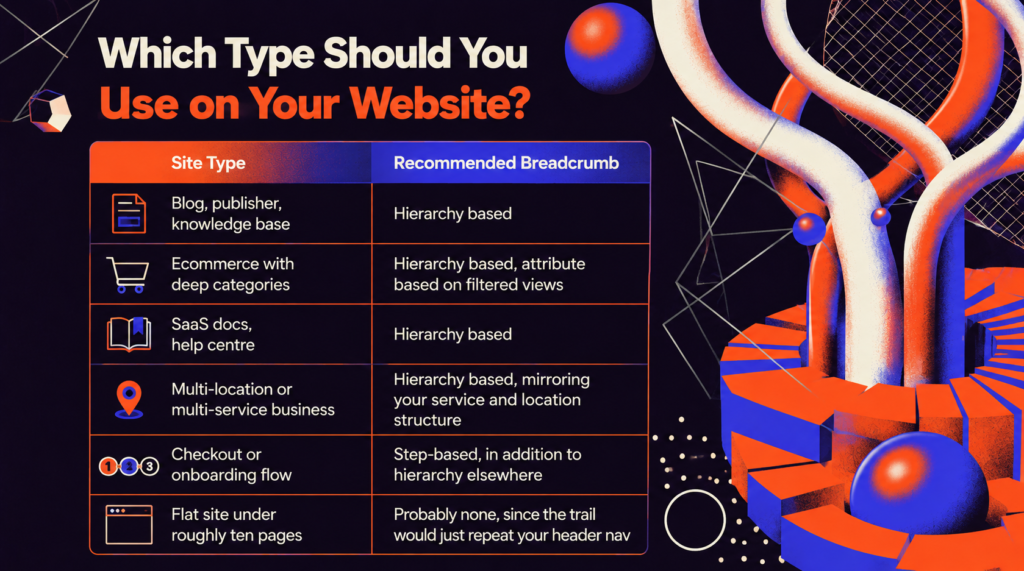
That last row matters. On a genuinely flat site, Home > About Us adds a line of visual clutter and no information. Breadcrumbs earn their keep at three levels of depth and beyond.
What Google Actually Says About Breadcrumbs in 2026
There is a lot of confidently wrong content circulating on this topic, so here is the accurate version.
Breadcrumbs still appear in desktop search results. Google’s structured data documentation states plainly that the breadcrumb feature is available on desktop, in every region and language where Search operates. Some articles claim Google removed breadcrumbs from desktop in late 2024, or that mobile lost them in 2026.
Mobile results show only the domain. In January 2025, Google rolled out a change that removed breadcrumbs from mobile snippets, which explains that the element was getting truncated on small screens and was not proving useful there.
Desktop was explicitly unchanged, and Google confirmed that sites using breadcrumb markup did not need to change anything. The Search Console breadcrumb report and the Rich Results Test kept working.
A breadcrumb ListItem for your homepage is not required. Google’s guidance says you do not need to include the top-level path, meaning your domain or host, and you do not need one for the page itself either.
Most sites include Home anyway because users expect it. That is a UX decision, not a compliance one. Google prefers a typical user path over a mirror of the URL.
The documentation recommends representing the path a person would realistically take to the page rather than mechanically transcribing your folder structure. In practice, for a well-organized site, these are the same thing. When they diverge, the user path wins.
Breadcrumbs are not a direct ranking factor. Google has never described breadcrumb markup as a ranking signal, and it is not listed as one.
What breadcrumbs do is influence the things that do carry weight: internal link distribution, crawl efficiency, hierarchical clarity, and user behaviour on your site. Anyone selling breadcrumb schema as a rankings lever is overselling.
Anyone dismissing breadcrumbs because they are not a ranking factor is underselling. You can declare more than one trail for a single page. This one is widely missed.
Google’s own documentation includes an example with two BreadcrumbList objects on one page, for content that is legitimately reachable through two different routes.
If a book award page sits under both Books > Science Fiction and Literature, you can express both. Most guides tell you to pick one path. Google says you may declare several when several genuinely exist. Use this deliberately, not as an excuse to fabricate paths.
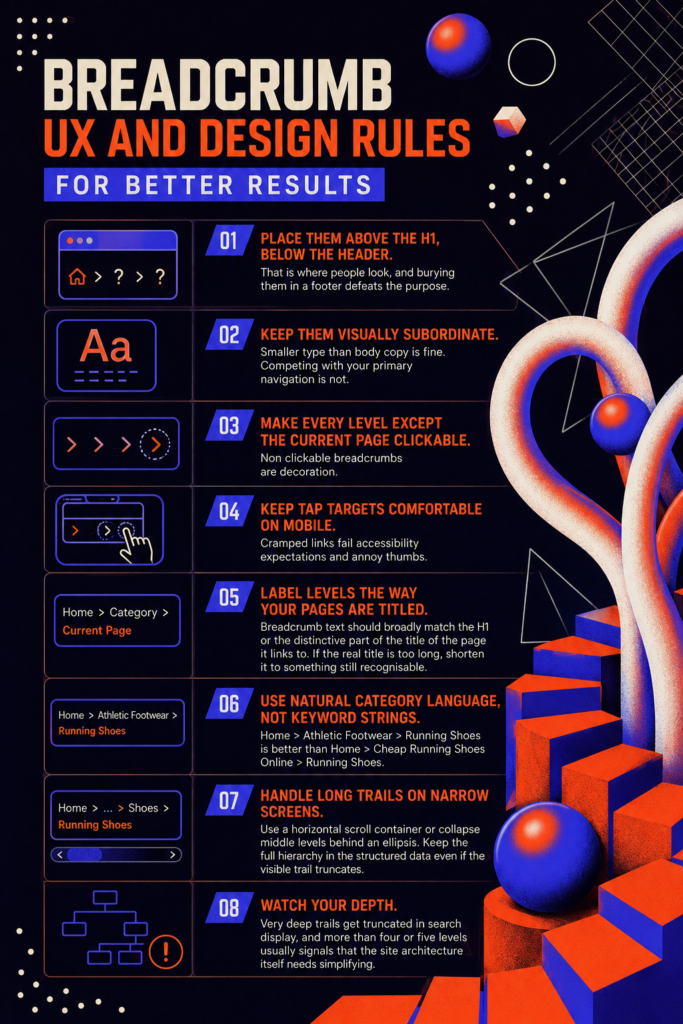
8 Breadcrumb UX and Design Rules for Better Results
These are the top 8 breadcrumb user experience and design rules for you to implement the best visual breadcrumbs for your site visitors and customers:
- Place them above the H1, below the header. That is where people look, and burying them in a footer defeats the purpose.
- Keep them visually subordinate. Smaller type than body copy is fine. Competing with your primary navigation is not.
- Make every level except the current page clickable. Non clickable breadcrumbs are decoration.
- Keep tap targets comfortable on mobile. Cramped links fail accessibility expectations and annoy thumbs.
- Label levels the way your pages are titled. Breadcrumb text should broadly match the H1 or the distinctive part of the title of the page it links to. If the real title is too long, shorten it to something still recognisable.
- Use natural category language, not keyword strings. Home > Athletic Footwear > Running Shoes is better than Home > Cheap Running Shoes Online > Running Shoes.
- Handle long trails on narrow screens with a horizontal scroll container or by collapsing middle levels behind an ellipsis. Keep the full hierarchy in the structured data even if the visible trail truncates.
- Watch your depth. Very deep trails get truncated in search display, and more than four or five levels usually signals that the site architecture itself needs simplifying.
10 Biggest Mistakes That Quietly Waste Your Breadcrumbs
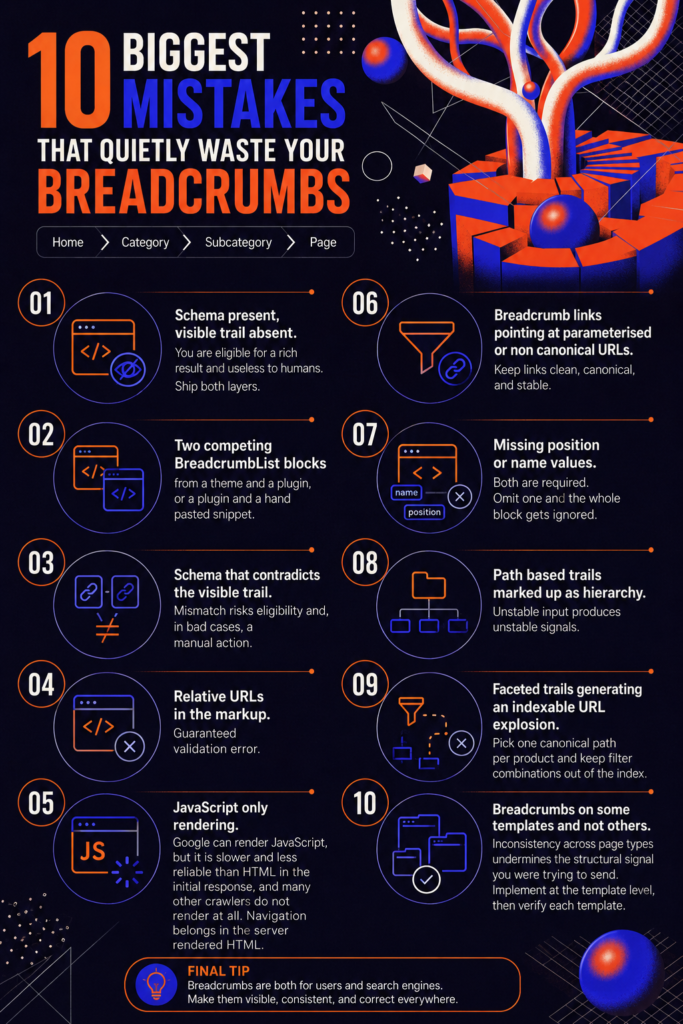
Some SEOs repeatedly do mistakes, and can’t understand they are doing mistakes that quietly wasting their breadcrumbs. Therefore, I’ve enlisted the top mistakes that SEOs do and waste their breadcrumbs:
- Schema present, visible trail absent. You are eligible for a rich result and useless to humans. Ship both layers.
- Two competing BreadcrumbList blocks from a theme and a plugin, or a plugin and a hand pasted snippet.
- Schema that contradicts the visible trail. Mismatch risks eligibility and, in bad cases, a manual action.
- Relative URLs in the markup. Guaranteed validation error.
- JavaScript only rendering. Google can render JavaScript, but it is slower and less reliable than HTML in the initial response, and many other crawlers do not render at all. Navigation belongs in the server-rendered HTML.
- Breadcrumb links pointing at parameterised or non canonical URLs.
- Missing position or name values. Both are required. Omit one and the whole block gets ignored.
- Path based trails marked up as hierarchy. Unstable input produces unstable signals.
- Faceted trails generating an indexable URL explosion. Pick one canonical path per product and keep filter combinations out of the index.
- Breadcrumbs on some templates and not others. Inconsistency across page types undermines the structural signal you were trying to send. Implement at the template level, then verify each template.
How to Test, Validate, and Monitor Breadcrumbs on Your Website
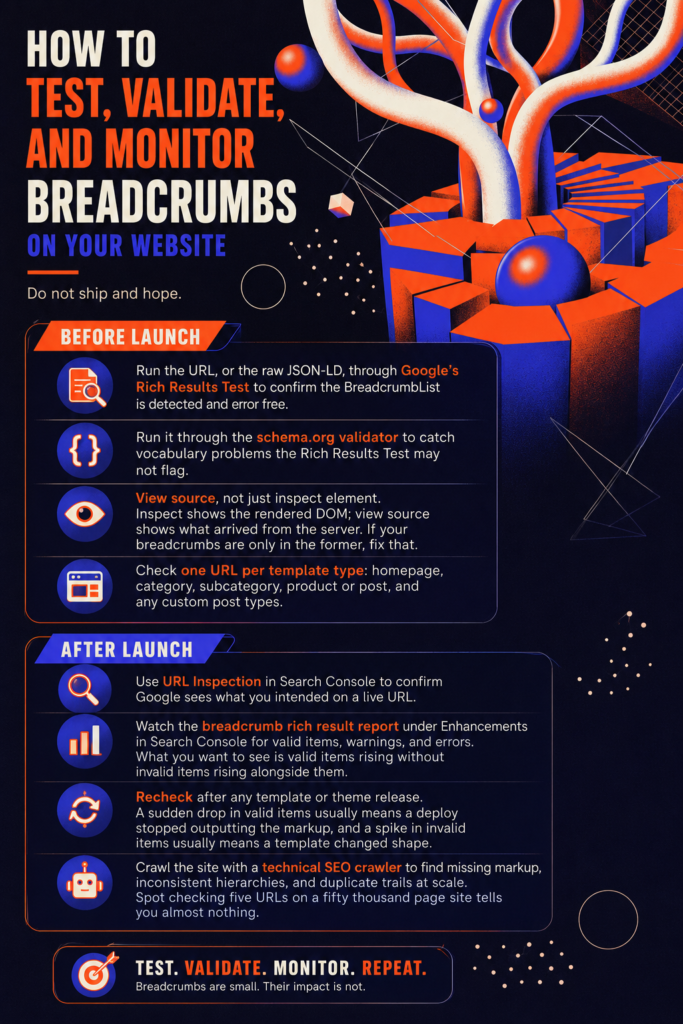
When launching a website, don’t ever ship and hope, but do your best to make it the best. Thereby, I’ve prepared some tests to validate and monitor your breadcrumbs on your website:
Before launch:
- Run the URL, or the raw JSON-LD, through Google’s Rich Results Test to confirm the BreadcrumbList is detected and error-free.
- Run it through the schema.org validator to catch vocabulary problems the Rich Results Test may not flag.
- View source, not just inspect element. Inspect shows the rendered DOM; view source shows what arrived from the server. If your breadcrumbs are only in the former, fix that.
- Check one URL per template type: homepage, category, subcategory, product or post, and any custom post types.
After launch:
- Use URL Inspection in Search Console to confirm Google sees what you intended on a live URL.
- Watch the breadcrumb rich result report under Enhancements in Search Console for valid items, warnings, and errors. What you want to see is valid items rising without invalid items rising alongside them.
- Recheck after any template or theme release. A sudden drop in valid items usually means a deploy stopped outputting the markup, and a spike in invalid items usually means a template changed shape.
- Crawl the site with a technical SEO crawler to find missing markup, inconsistent hierarchies, and duplicate trails at scale. Spot checking five URLs on a fifty thousand page site tells you almost nothing.
Final Thoughts on Breadcrumbs in SEO
Breadcrumbs are not the flashiest thing on a technical SEO checklist, and they were never a ranking lever. What they are is structural infrastructure: a template-level element that generates internal links, and keeps orphan pages nearly impossible to create.
The 2025 mobile snippet change removed one visible benefit out of many. If that change made your breadcrumb strategy feel pointless, the strategy was too thin to begin with.
So the useful question is not whether breadcrumbs help SEO, but it’s whether your site has a hierarchy worth describing. If it does, describe it clearly, in the HTML and in the structured data, keep the two in agreement, and validate it after every deploy.
People Also Ask About Breadcrumbs in SEO
Q1. Are breadcrumbs a Google ranking factor?
No, not directly. Google has never listed breadcrumb markup as a ranking signal, but it strengthens the ranking factors by developing interlinks.
Q2. Did Google remove breadcrumbs from search results?
Only from mobile. On January 23, 2025, Google stopped showing breadcrumbs in mobile snippets, where they were frequently being cut off on small screens, and mobile results now show just the domain.
Q3. Do I need BreadcrumbList schema if my breadcrumbs are already visible on the page?
Yes, of course. If you want the desktop search to display. The visible trail delivers the internal linking, crawl, and usability benefits on its own.
Q4. Should the homepage be included in the breadcrumb trail?
It is optional. Google’s guidance states that a ListItem for the top-level path, your domain or host, is not required, and neither is one for the current page.
Q5. Where should breadcrumbs appear on a page?
Directly below the header and above the H1 is the conventional position, and convention matters here because users scan that area looking for orientation cues.