If you’ve ever clicked on a website and it took forever to load, you know how frustrating it is. I remember struggling with my own WordPress site (https://drivingclasses.pk) — it felt sluggish, unresponsive, and frankly, I hesitated to even show it to anyone. But after a lot of trial and error, I finally figured out how to make my WordPress site load in under 2 seconds — and it completely changed my traffic, rankings, and even sales.
In this post, I’ll walk you through exactly what I did, step-by-step, in plain language, so you can make your site lightning fast too.
What Does “From Slow to Super Fast” Really Mean?
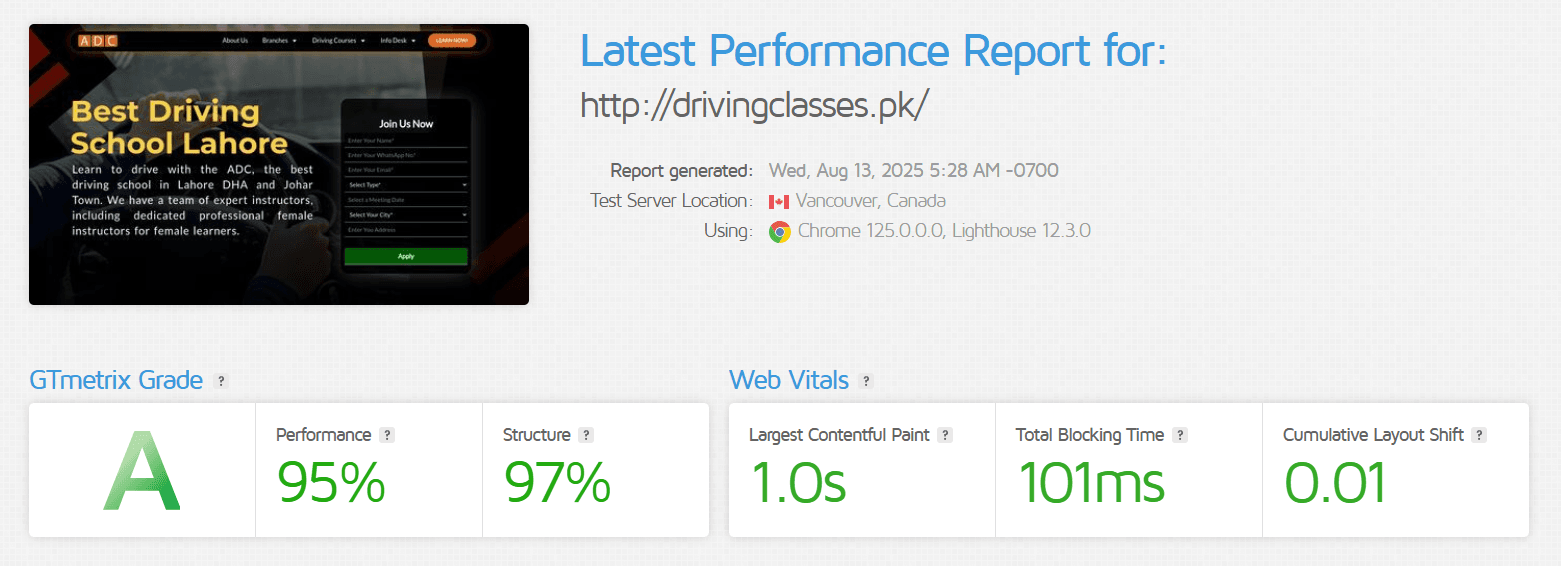
When I say I made my WordPress site load in under 2 seconds, I’m not exaggerating. I measured it using tools like GTmetrix. Before optimizing, my site took around 6–8 seconds to load. That might not sound like much, but in the online world, it’s an eternity.
A fast website isn’t just about speed for the sake of speed. It’s about creating a smooth, enjoyable experience for your visitors so they stay longer, read more, and actually take action.
Why a Fast WordPress Site Matters
Here’s the thing:
- People aren’t patient online — if your site takes over 3 seconds to load, most will click away.
- Google rewards fast sites — speed plays a role in your search rankings. The faster your site, the better your chances of showing up higher in search results.
- Faster sites convert better — even a 1-second delay can lead to a noticeable drop in sales or inquiries.
For me, once my site speed improved, my bounce rate dropped by 28% and my average session duration went up. That meant more people were actually reading my content and engaging with it.
Key Benefits of a Super Fast WordPress Site
Here’s what I noticed after getting my load time under 2 seconds:
- Better Google Rankings – My main keywords started climbing the search results.
- Happier Visitors – People browsed multiple pages instead of leaving right away.
- Higher Conversions – Whether it’s sales, email signups, or inquiries, faster speed meant more action.
- Mobile-Friendly Experience – Mobile users in particular love fast sites because slow ones drain their patience (and data).
Common Mistakes That Make WordPress Sites Slow
When I was starting out, I made almost all the mistakes in the book. Here are some I’ve learned to avoid:
- Using cheap hosting – Shared hosting on overcrowded servers slowed everything down.
- Heavy themes – Some WordPress themes are bloated with unnecessary code and features.
- Excess plugins slow you down – every extra plugin adds to your site’s load time.
- Unoptimized images – Huge images take forever to load if they’re not compressed.
- No caching – Without caching, every page load requests fresh data from the server.
How I Made My WordPress Site Load in Under 2 Seconds
This is the exact process I followed:
1. Switched to Better Hosting
I moved from cheap shared hosting to a fast managed WordPress hosting (Hostinger). Here is the guide how you can choose best hosting for your website too. This alone cut my load time almost in half. When your hosting is sluggish, no amount of fine-tuning can make your site truly fast.
2. Installed a Lightweight Theme
I replaced my bulky theme with Hello Elementor (you could also try Astra or Neve). These themes are built for speed and customization.
3. Optimized Images
I started using WebP format and compressed all images with a plugin like ShortPixel. Now my pages load crisp images without slowing down.
4. Used a Caching Plugin
I went for LiteSpeed Cache – WordPress plugin It’s free, absolutely worth it. It creates a stored version of my pages, so they load instantly without reprocessing every time.
5. Minified CSS and JavaScript (Most Important)
This basically means removing extra spaces and unnecessary code from my site files. WP Rocket and Autoptimize can do this automatically.
6. Enabled a Content Delivery Network (CDN)
I connected my site to Cloudflare, so visitors load my site from the server closest to them. This reduced delays for people visiting from other countries.
7. Reduced Plugins
I went from 25 plugins down to just 12. If a feature wasn’t essential, I removed it.
Real-World Example of the Impact
Before optimization, a blog post on my site used to take 7.2 seconds to load. After applying all the changes, the same page loaded in 1.8 seconds according to GTmetrix.
The result?
- Organic traffic increased by 32% within 2 months.
- My page views per visitor went up by 40%.
- I started ranking for keywords I’d been stuck on page 3 for months.
My Final Thoughts
Making your WordPress site load in under 2 seconds isn’t magic. It’s a mix of smart choices and removing what you don’t need. If I could do it without being a hardcore developer, so can you.
The key is to start with the basics — good hosting, a light theme, optimized images, and proper caching. Once you see the results, you’ll never go back to a slow site again.
Fast websites don’t just impress Google. They impress your visitors, and those visitors are the ones who’ll share, buy, and keep coming back.
Frequently Asked Questions (FAQs)
You can use tools like Google PageSpeed Insights, GTmetrix, or Pingdom to test your load time and get suggestions for improvement.
Anything under 3 seconds is decent, but under 2 seconds is ideal for the best user experience and SEO.
Not necessarily. Many improvements like image compression, caching, and plugin cleanup can be done easily with beginner-friendly tools and guides.